How to fix one scene of an AI video without remaking the whole film
AI films are made scene by scene, so when one scene goes wrong you shouldn’t have to throw away the other nine. Here is how to remake one scene, say what should change, and keep the rest of your film exactly as it was.
By the Filmlume team ·
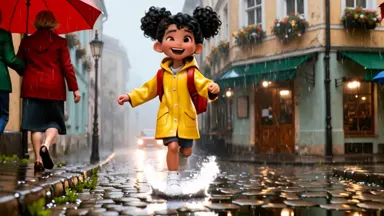 Before
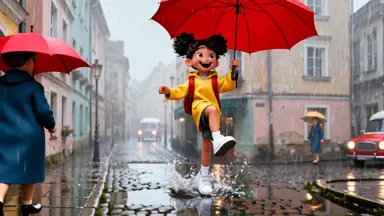 After
The problem: one bad scene in a good film
You write a story, the AI plans it into scenes and films each one. Most come out right. Then one scene has a second copy of your character, the wrong weather, a face that doesn’t fit the moment or an object that shouldn’t be there.
With most tools your choices are poor: make the whole video again and hope the bad scene comes out better (paying for every scene again, and maybe losing the scenes you liked), or export the video and patch it in an editor.
How to fix just that scene in Filmlume
- Open the finished film in your library. Under the video you’ll find Fix a scene: a contact sheet of every scene with its picture, its length and what happens in it.
- Pick the scene that’s wrong. You can pick several.
- Optionally write what should change, in plain words: “only one bird, on the top branch”, “she should be smiling”, “make it night”, “she holds a red umbrella”. Leave it empty to simply try the scene again.
- Check the price, shown before anything is made, and press Remake.
- A new film arrives in your library with the scene remade. The first version stays as it was, so you can compare them and keep the one you like.
What stays the same, and what you pay
- Every other scene is kept frame for frame. Only the scenes you picked are made again.
- Your characters, places, style and quality stay the same. The remake uses the same look as the rest of the film, so the new scene fits in.
- You pay for the remade scenes, plus making the sound again for the whole film, so the sound runs smoothly across the new cut. Not for the whole film again.
- If the remake fails, its credits come back automatically, like any other run.
If the scene you pick runs straight on from the next one (the same moment continuing), that scene is remade with it, so the cut between them stays smooth. The price already includes it, and you see which scenes will be remade before you start.
A real example
The film above is a 15-second Cinematic story about a girl in a yellow raincoat in a rainy old town. We picked only scene 1 and wrote: “She carries a big bright red umbrella over her head as she walks and splashes.” Scene 1 came back with the umbrella; scenes 2 and 3 are the same frames as before. The before and after stills are above.
A user who tested it on their own film had a second, unwanted bird in one scene. Their frame-by-frame check found the frames before and after the fixed scene exactly identical, and the extra bird gone.
Notes that work well
- Say what you want to see, not only what is wrong: “one bird, on the top branch” works better than “no extra bird”.
- Keep it to the scene: things a camera would see (people, objects, light, weather, expression, action).
- One clear change per scene gives the most predictable result. Fix a second thing in a second pass.
- If a scene is wrong because the story itself should change, it is often better to edit the plan and make a new film.
What it is not
Fix a scene remakes scenes; it is not a video editor. You can’t cut, reorder or add your own clips or music in Filmlume today. For a single moment that came out wrong, though, it is the quickest and cheapest way to a film you’re happy with.
Try it yourself. New accounts get $1.00 of free credit, no card needed. You see the plan and the price before anything is made.
Make a film, then fix any sceneQuestions
Can I regenerate just one scene of an AI video?
Yes. In Filmlume, open a finished Story film, choose Fix a scene, pick the scene and optionally say what should change. Only that scene is made again; every other scene is kept frame for frame.
Do I pay for the whole video again?
No. You pay for the scenes you remake, plus making the sound again for the whole film so it fits. The price is shown before you start, and a failed remake is refunded automatically.
Will the characters look the same in the remade scene?
Yes. The remake uses the same characters, places, style and quality as the rest of the film, so the new scene fits in.
Is my original film replaced?
No. The remake is a new film in your library, and the original stays as it was.